Battlefield 6 – How to Fix ‘Game not Released’ Error
Resolve the ‘Game not Released’ error in Battlefield 6 on Steam by unticking specific DLCs, restarting your PC, or removing the game’s manifest file. Follow these simple steps to get back in the game.
Before Continuing Try the Following
“In Steam, open the game’s Properties, then untick both the Battlefield Multiplayer HD Marker and Battlefield Multiplayer Marker DLCs.”
This fixed the problem for some people too.
If this does not work, continue to the next step.
Two Other Easier Potential Fixes
Restart your PC.
Or
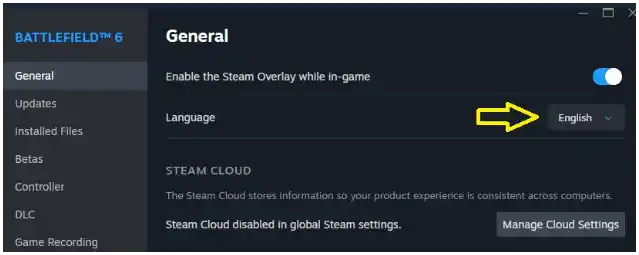
Try changing Battlefield 6’s language in the game’s Steam properties page, accessible by right clicking the game’s portrait.
If this does not work, continue to the next step.
Backup Your Game Files Manually
Backup your game files manually from SteamApps\Common just in case. But you shouldn’t need to do this.
What You Need to Do to Fix the Error!
First exit Steam. Then you need to remove the manifest file for BF6. It looks like this ‘appmanifest_2807960.acf’. You will find this file in the SteamApps folder, which is inside the Steam folder on which ever drive you installed the game. Do not uninstall BF6, just remove the manifest file. Then start Steam. Steam will show BF6 as installable. This is normal. Then install BF6, Steam will verify the existing game files. If it doesn’t work, RESTART Steam, it will then work and the Play Button will show.
This is what fixed it for me.
Seems This Error Has Finally Been Fixed!
If you’re still having issues with launching or other issues, consider using EA Forums, Steam Support.
Remember to PTFO!