Forza Horizon 6 – How to Take Realistic Photos
This guide focuses on creating more realistic and natural-looking screenshots in Forza Horizon 6 using the in-game Photo Mode settings.
Rather than relying on heavily saturated or overly bright presets, these settings aim for a cleaner, cinematic look that closely resembles real-life automotive photography.
The Basics of FH6 Photography
Forza Horizon 6 features significantly more advanced lighting compared to previous titles in the franchise. Dynamic weather, ray-traced reflections, dense city environments, and volumetric lighting can drastically change how a screenshot looks depending on your scene.
Because of this dynamic environment, there is no universal “perfect” setup that works everywhere. The goal of this guide is to provide a strong baseline that produces consistently realistic-looking images in most situations.
The two most important settings by far are Exposure and Brightness. Learning how these interact with different lighting conditions will make a much bigger difference than tweaking smaller, secondary settings.
In general, realistic screenshots tend to look:
- Slightly darker rather than overly bright.
- Less saturated in color.
- Lower in contrast than typical “social media style” screenshots.
- Cleaner and more natural overall.
Pro Tip: Cloudy weather and sunrise/sunset conditions usually produce the most realistic and visually pleasing results for automotive photography.
Exposure and Brightness Guidelines
To achieve a photorealistic look, you need to balance light and shadow perfectly.
The Rule of Thumb:
- Exposure should usually be at or above 50.
- Brightness should usually stay at or below 50.
The Exceptions: During nighttime scenes or extremely dark weather conditions, much higher Exposure values (around 75) may be required to illuminate the subject.
However, raising Brightness above 50 will very often make the image appear washed out, flat, and unnatural. If your image lacks depth, Brightness is usually the first setting you should reduce.
A Good Approach to Lighting:
- Adjust Exposure first until the car and the surrounding environment are properly visible.
- Then, lower Brightness until the image regains its natural depth and contrast.
- Note: Black or dark-colored cars often require slightly higher Exposure values than bright-colored vehicles to show body lines and reflections properly.
Recommended Photo Mode Settings
These are the baseline settings recommended for achieving a cinematic, realistic look. Apply these in your game and tweak them based on the time of day and weather.
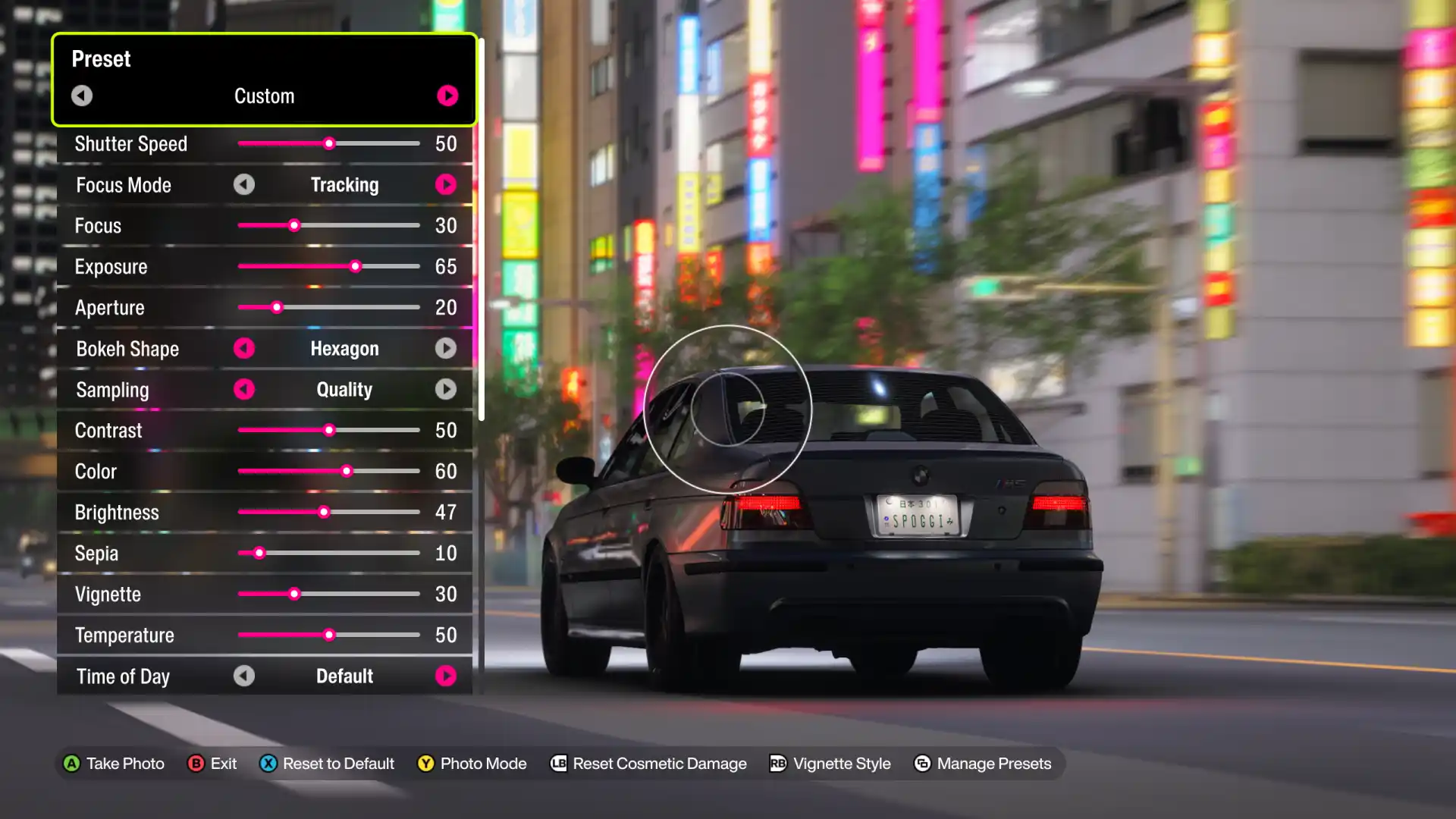
- Shutter Speed: 50
- Focus Mode: Tracking
- Focus: 30
- Exposure: ≥ 50 (Adjust based on lighting)
- Aperture: 20
- Bokeh Shape: Hexagon (Personal preference, but highly recommended)
- Sampling: Quality
- Contrast: 50
- Color: 55
- Brightness: ≤ 50 (Lower for more depth)
- Sepia: 10
- Vignette: 30 (Adjust to personal preference)
- Temperature: 50
Additional Composition Recommendations
- Avoid excessive Depth of Field (Aperture): Too much blur makes the image look like a miniature toy car rather than a real vehicle.
- Camera Angles: Lower camera angles (closer to the ground) usually look more grounded and realistic.
- Bokeh: Hexagon or Circle bokeh shapes tend to mimic real-world camera lenses the best.
Scene Examples & Case Studies
Here is how you can adapt the baseline settings to specific environmental conditions in Forza Horizon 6:
1. Sunny Daytime Scene
- Exposure: 55
- Brightness: 45
- Result: You achieve natural highlights on the car’s paint and deeper, realistic shadows without the image appearing washed out by the virtual sun.
2. Standard Nighttime Scene
- Exposure: 75
- Brightness: 50
- Result: Maintains good visibility of the car while preserving deep contrast. It perfectly avoids the “grey, washed-out” look that often ruins night photography.
3. Brightly Lit Nighttime City Scene
- Exposure: 65
- Brightness: 47
- Result: Captures strong neon lighting and ray-traced reflections beautifully. The image stays natural, and the bright lights don’t blow out the details of the car.